How to Build a Pre-Launch Email List on Shopify (Before You Have a Single Product in Stock)
Most Shopify merchants build their email list after they have products to sell. The brands that sell out in minutes do it before. Here's exactly how to collect hundreds of pre-qualified email signups before you have a single unit in stock.
Why your email list is the wrong thing to build first
A standard Shopify email list collects subscribers who said "yes" at some point. A standard cold email form converts 2–5% of landing page visitors to subscribers (ReferralCandy Q1 2026 benchmark across 3,200+ Shopify stores). Your pre-launch waitlist needs something more specific: people who are already motivated to buy a specific product, before it exists. Those are different people, and building the wrong list first is why most Shopify launches underperform.
A generic subscriber who joined your list six months ago has essentially forgotten about you. A waitlist subscriber who signed up 10 days ago, has been watching their queue position, has referred two friends, and has been counting down to the release date — that person will buy the moment the launch email hits their inbox.
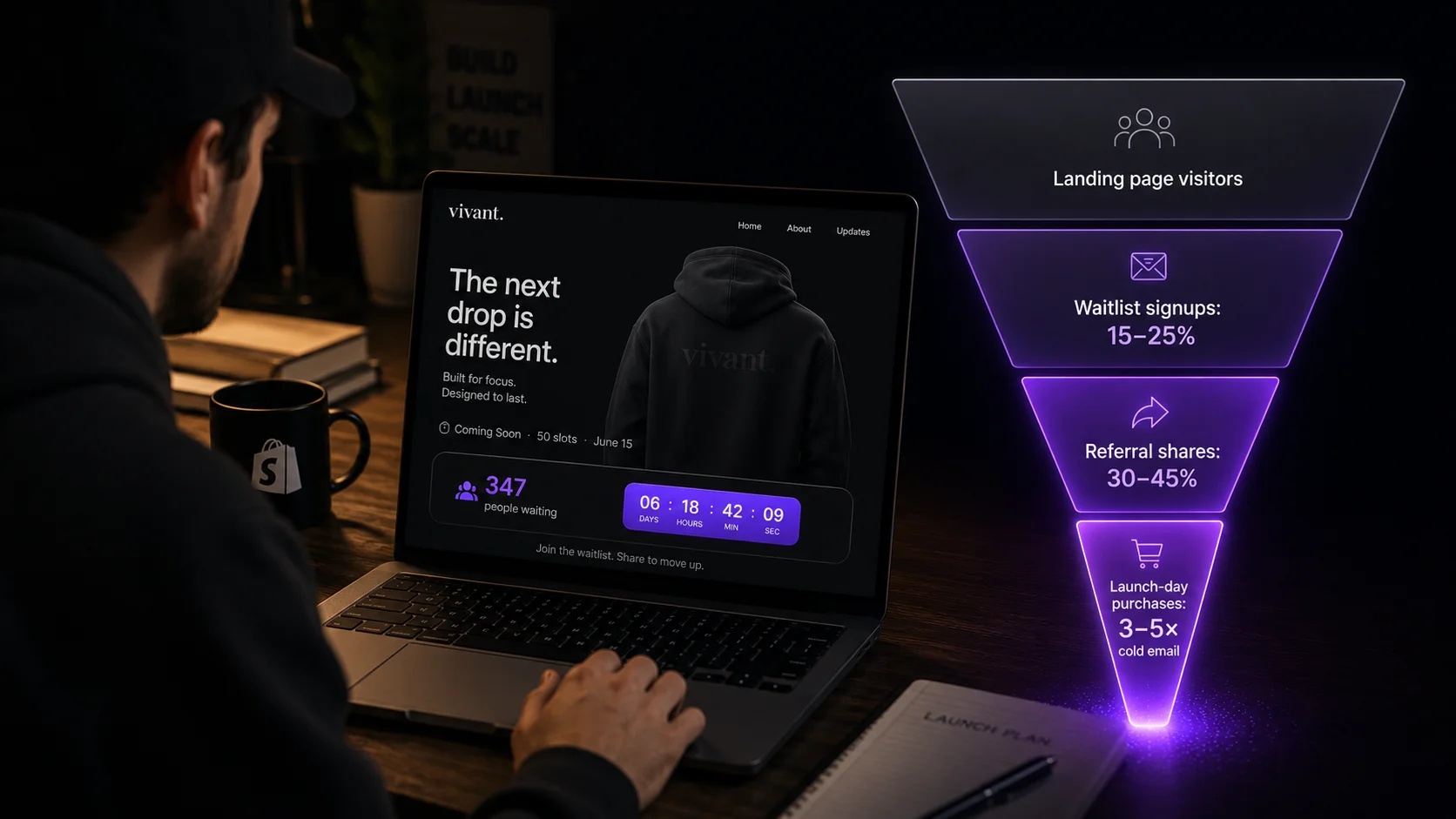
Research from ReferralCandy across over 3,200 Shopify and WooCommerce stores found that waitlist members who received referral incentives converted to purchase at 3–5× the rate of cold email subscribers on launch day. The referral mechanic doesn't just grow your list — it pre-selects your most motivated buyers and surfaces them to the front of the queue.
The conversion funnel: from cold visitor to paying customer
Here's how a referral-powered pre-launch waitlist performs at each stage compared to a standard email signup form:
Conversion ranges: ReferralCandy Benchmark Report Q1 2026 (n=3,200+ Shopify/WooCommerce stores)
The difference at the top of the funnel is driven by one thing: the queue mechanic creates urgency that a passive signup form doesn't have. Email marketing tools like Klaviyo, Mailchimp, and Omnisend collect subscribers efficiently — but there's no queue, no position, and no incentive to share before launch day. You're not asking someone to subscribe to a newsletter — you're inviting them to compete for a limited number of spots in a product that may sell out before they get access. That's a fundamentally different value proposition.
Step-by-step: building your pre-launch list with a referral waitlist
Create the drop before you announce anything
Install EZDrop and create your first drop: pick the product (even if it's not live in your store yet), set a slot limit, and choose a release date 10–21 days out. The waitlist page is live the moment you activate. You don't need the product to be available — just the page.
Seed with 20–30 warm entries before going public
Send the waitlist URL privately to 20–30 people: existing customers, newsletter VIPs, friends who match your audience. Get your count above zero. New visitors need to see social proof, not an empty list. "Join 0 people on the waitlist" converts poorly. "Join 34 people already waiting" converts much better.
Add the EZDrop badge to your product page
Drag the EZDrop app block onto your product page in the Shopify Theme Editor. This places a live entry counter and countdown timer on the page. Every organic visitor — from Google, social, word of mouth — sees the social proof without any action from you. This is the part most merchants skip, and it's where a significant portion of your signups will come from.
Make your public announcement
Email your existing list, post on Instagram, post a TikTok teaser. Keep the copy focused on scarcity and the referral mechanic: limited slots, the queue rewards sharing, the countdown is real. Every person who signs up gets a unique referral link in their confirmation email that moves them up the queue when friends join — so your announcement creates a distributed marketing force the moment it goes out.
Mid-cycle update (Day 7–9)
Send a single "waitlist update" email to your list: current signup count, a reminder of how the referral mechanic works, and their personal link (from their original confirmation email). This is consistently the highest-converting email in the pre-launch sequence — it activates people who signed up but haven't shared yet by making the competition visible.
48-hour countdown push
Final urgency email: live count, exact launch time, and a reminder that positions lock when the drop goes live. Post on every channel. Your most motivated waitlisters will make one last push to improve their ranking — and bring in a final wave of signups in the last 48 hours.
Launch day — automated emails go out
EZDrop recalculates final positions and sends launch-day emails to the top-ranked waitlisters automatically. Each email contains a direct link to your Shopify product page. They purchase through your normal checkout — no extra fees, no payment held by EZDrop. You do nothing except watch the orders come in.
What makes a pre-launch waitlist different from a generic email signup
The key distinction is earned position vs. passive subscription. A standard email signup asks for nothing from the subscriber after they join. A referral waitlist gives every subscriber an ongoing reason to be active — they can improve their position by sharing, and they know exactly where they stand relative to the slot limit.
The Attentive Consumer Trends Report 2025 found that 56% of shoppers name members-only sale access as a top loyalty perk — the second most-valued benefit after free shipping. A pre-launch waitlist gives your most engaged customers exactly this: first access, earned through early action and word of mouth, not just spending history.
This matters for your list quality as much as your list size. The subscribers who win your first drop will remember it. They become the core of your next launch audience — a segment that already knows how the referral mechanic works and will activate faster the next time.
What your pre-launch waitlist email sequence should look like
You need exactly three emails for a 14-day waitlist window:
- Day 1 — Signup confirmation: Position number, referral link, how the queue works (plain language), and launch date. Keep it short. The referral link is the most important element — put it above the fold.
- Day 7–9 — Mid-launch update: Current waitlist count, reminder of referral mechanic, their personal link again. Subject line: "You're currently #[position] on the waitlist — here's how to move up."
- Day 13–14 — Final countdown: Current count vs. slots, exact launch time, final CTA to share. Subject line: "[X] hours left to improve your position."
Don't send more than this. Over-emailing your waitlist before launch is the fastest way to get unsubscribes from the people who are most motivated to buy.
For a comparison of waitlist models and which one drives the most organic reach, see Shopify Raffle Drop vs. First-Come-First-Served. For the full 14-day launch playbook, see How to Build a Viral Product Launch Waitlist on Shopify.
Start building your pre-launch list today
EZDrop is the Shopify waitlist app built for pre-launch email list growth. Free plan — 1 active drop, 500 entries. No credit card needed.
Install EZDrop free →5-minute setup · no developer needed · purchase stays in your Shopify checkout