Shopify Drop Day Checklist: 11 Things to Do Before You Open the Queue
You've spent two weeks building waitlist momentum. Don't lose it in the last 72 hours to a broken checkout, a misconfigured email, or bot traffic that eats your inventory before real customers get through. This is the exact checklist to run before every drop.
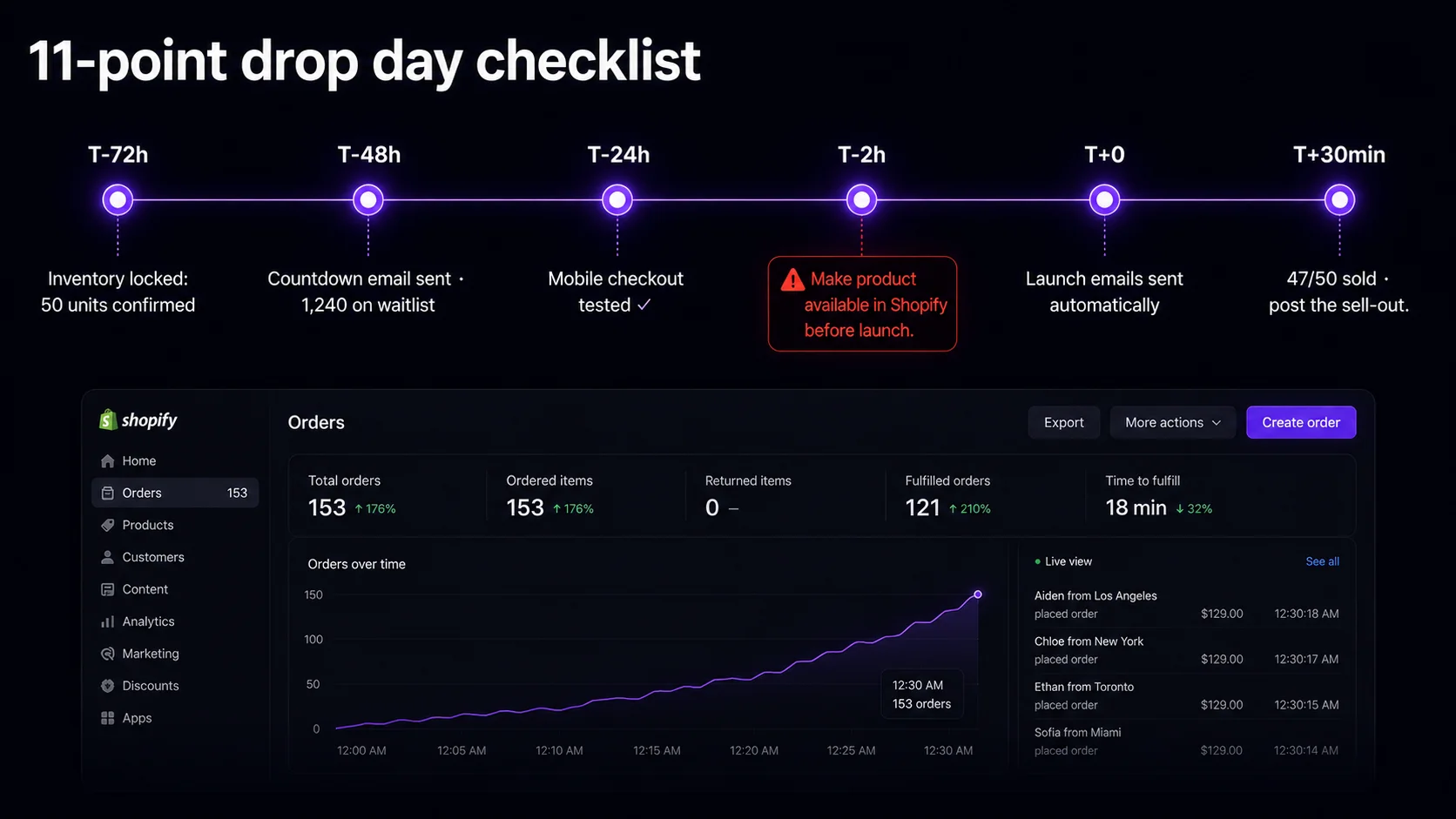
The drop-day timeline: T-72h to T+30min
Confirm your Shopify product inventory count matches your drop slot limit. If you promised 50 slots in your waitlist and you have 48 units in stock, fix the discrepancy now — not at T-1 hour.
Send the last pre-launch email: current waitlist count, exact launch time with timezone, referral link reminder. This is the highest-converting email in your sequence — don't skip it.
Complete a real test purchase on an actual mobile device — not a browser resize on desktop. Over 70% of Shopify traffic is mobile (Shopify 2026 Commerce Trends). A checkout that breaks on iPhone on drop day is catastrophic.
Post "2 hours until [drop name] opens" on your highest-engagement channel. Include the slot count and a screenshot of the current waitlist number for maximum FOMO.
If using EZDrop, the app recalculates final positions and sends launch emails to your top-N waitlisters automatically. Your job is to watch the orders come in and monitor for any Shopify admin alerts.
Post a "X% sold in the first 30 minutes" update on social. This serves two purposes: social proof for people still deciding, and a signal to non-winning waitlisters to sign up for the next drop.
The 11-point pre-launch checklist
- 1
Shopify inventory count matches your drop slot limit
Check your Shopify admin: Products → [product] → Inventory. The quantity must be ≥ your EZDrop slot count. If you've set 50 slots but only have 45 units, update before launch. Overselling creates refunds and kills trust.
- 2
Product is set to "Continue selling when out of stock" = OFF
In your Shopify product settings, confirm "Continue selling when out of stock" is unchecked for the drop variant. When your last unit sells, the product should go unavailable — not continue accepting orders you can't fill.
- 3
EZDrop badge is visible on the product page (incognito test)
Open your product page in an incognito browser window and confirm the live counter and countdown badge are showing correctly. Incognito bypasses any admin-only visibility settings. This is what new visitors and waitlisters see when they click the launch email link.
- 4
Your top waitlisters are reviewed for obvious spam entries
Scan the top 20–30 entries in your EZDrop dashboard for obvious fake emails (random strings, disposable domains like mailinator.com, multiple entries from the same IP pattern). Remove any before launch emails go out. This is a 5-minute task that prevents launch emails from going to non-buyers.
- 5
Mobile checkout test completed on a real device
Use an actual iPhone or Android to complete a test order (then cancel it immediately). Check: product images load, Add to Cart works, checkout form works on mobile keyboard, payment completes. A broken mobile checkout on drop day is the most common cause of abandoned carts in the critical first 30 minutes.
- 6
Launch email preview sent to yourself
If you've customized the EZDrop launch email, send a test to yourself 24 hours before launch. Verify: subject line renders correctly on mobile, the link to your Shopify product is correct and working, the sender name and address are set as you want them.
- 7
48-hour countdown email sent to your full list
Not just your waitlist — your whole email list. The final 48-hour email captures last-minute signups who missed your earlier announcement. Include the live waitlist count, the exact launch time with timezone, and a reminder that referrals still move positions up right until launch.
- 8
Social content scheduled for T-2h and T+0
Pre-schedule two posts: a "2 hours to go" urgency post and a "we're live" post at launch time. Don't rely on remembering to post manually in the chaos of launch day. Scheduling ensures consistency even if you're distracted handling orders.
- 9
Payment gateway test passed within the last 7 days
Shopify Payments, PayPal, and Stripe all have rare outage windows. If you haven't processed a real transaction in the past week, run a $1 test order 24 hours before launch. An undiscovered gateway issue on drop day is unrecoverable.
- 10
Shipping rates and fulfillment settings confirmed
Verify your shipping zones cover everywhere you're accepting orders. For limited drops, consider restricting checkout to a specific geographic region if you have fulfillment constraints. A drop that accepts international orders you can't ship creates refund nightmares.
- 11
Post-drop "sold out" update plan ready
Have your "sold out" social post and email ready to send within 30 minutes of selling out. "Sold out in [X] minutes — thank you to everyone who waited" is a powerful social proof moment. Do it fast while the energy is high. Include a CTA for your next drop notification list.
The bot problem — and why a waitlist largely solves it
Akamai's 2026 data found that bots now represent a substantial portion of e-commerce traffic during high-demand product launches, with bot-driven requests spiking sharply on drop days for popular brands. For standard FCFS drops, this means bot operators can clear your inventory before most real customers reach the checkout page. Enterprise bot-mitigation tools like Queue-It or Akamai Bot Manager can reduce this risk, but they start at $500+/month and are impractical for most Shopify merchants.
A referral-queue waitlist naturally neutralizes most of this risk without those costs. Bots cannot generate valid referral links — they require a real human email that can receive and forward to friends. They cannot climb the queue organically. The waitlist mechanic means your top buyers are already identified before launch day; the launch email sends a direct checkout link to verified humans.
This doesn't make a waitlist drop completely bot-proof at the Shopify checkout level, but it dramatically reduces bot advantage compared to a public FCFS launch. Your top-N waitlisters have 5–15 minutes after receiving the launch email to complete checkout — a window long enough for a human but that bot operators don't monitor per-drop.
What to do in the first 30 minutes after launch
Watch, don't intervene. Your first 30 minutes are for monitoring, not firefighting. Have your Shopify admin orders page open. Have your EZDrop dashboard open. Watch orders come in and waitlist entries update.
Post the T+30 social update with your sell-through percentage. "47 of 50 units sold in the first 20 minutes" is more powerful than any ad copy you could write. It validates your product, creates FOMO for your next drop, and gives non-winning waitlisters a reason to stay subscribed.
Export your full waitlist CSV immediately after launch. This is your warmest possible audience segment for your next drop — people who competed for this one and lost. Email them first when you announce the next waitlist opening. Their intent is proven.
For the full 14-day pre-launch strategy, see How to Build a Viral Product Launch Waitlist on Shopify. For a comparison of drop models (raffle vs. FCFS vs. referral queue), see Shopify Raffle Drop vs. First-Come-First-Served.
Run drops that actually sell out
EZDrop — the Shopify waitlist app — handles the queue, waitlist, and launch emails automatically. Free plan, no credit card required.
Install EZDrop free →5-minute setup · works with any Shopify plan and theme