Sold Out on Black Friday? Open a Restock Waitlist and Keep the Sale
When a best seller sells out on Black Friday, shoppers keep visiting its page all weekend. With only a Sold out button there, all they can do is leave. A restock waitlist gives them something to do instead. They leave an email and hear first when it's back. Below is the whole setup, with a small knitwear shop as the example.
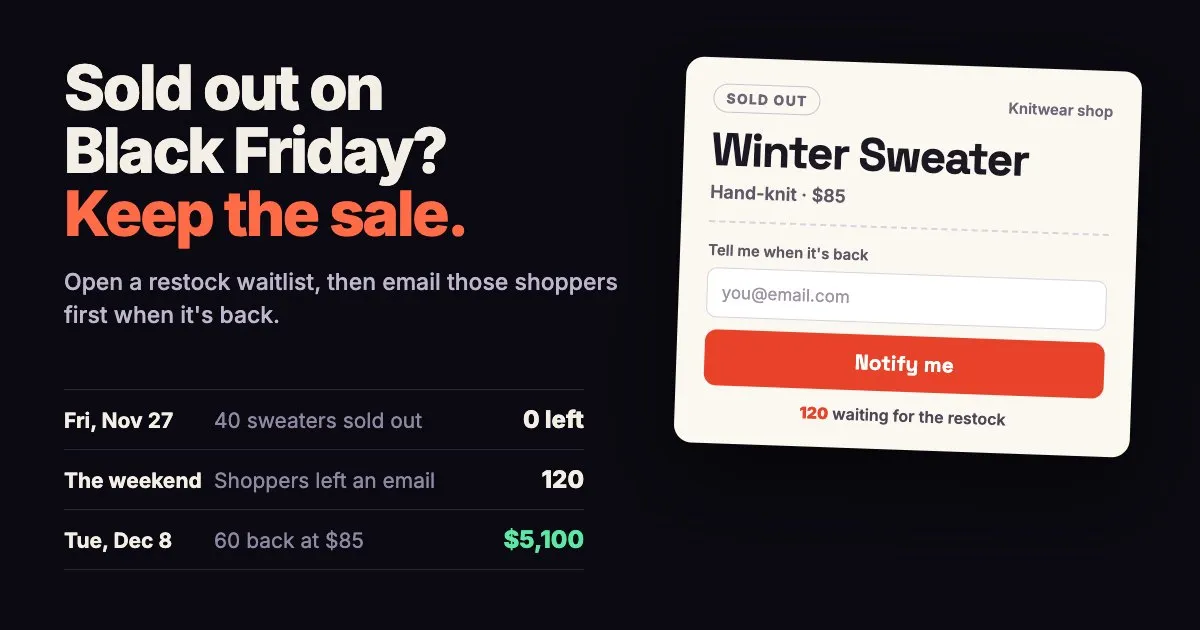
In one line: When a product sells out on Black Friday, keep its page up and add a Notify me box so shoppers can leave an email. Order the restock and open a waitlist for the same product with a release date. When the new stock is in, email the front of the line first. Keep your full price, since these shoppers already asked for it.
- Keep the sold-out product published, so shoppers who find it can still sign up.
- Add a Notify me box to the page and change its text to something like Tell me when it's back.
- Reorder by the number of sign-ups, and pick a release date that still ships before Christmas.
- Run the restock as a new drop of the same product, with one launch email for each unit coming back.
- Keep your full price and limit each order, so the restock reaches as many of those shoppers as possible.
What should you do when a product sells out on Black Friday?
Leave the product published. A product that's out of stock still has its page and its reviews, and your store shows a Sold out button where Add to cart used to be. If you hide or delete it, everyone who clicks an old link or an ad lands on an error page.
Then give those shoppers a next step. A restock waitlist is a short form on the sold-out page. The shopper leaves an email and gets a note saying they're on the list. When the product is back, they hear from you first. You get a list of real buyers, and the count tells you how many to reorder.
If the page says Sold out while you still have stock in the back room, the stock count needs fixing, and a waitlist won't help. Our EZstock guide to why a Shopify store says sold out covers the usual causes and the fix for each.
An example: 40 sweaters gone by Friday afternoon
Say you run a small knitwear shop. Your hand-knit winter sweater sells for $85, and you had 40 of them. By Black Friday afternoon they're gone.
On Friday evening you turn on a Notify me box on the sweater's page. Over the weekend, 120 shoppers leave their email. Your knitter can make 60 more by Tuesday, December 8.
| When | What happens |
|---|---|
| Fri, Nov 27 | The last sweater sells. You add the Notify me box. |
| Nov 27 to 30 | 120 shoppers leave their email. |
| Mon, Nov 30 | You open the restock waitlist, with a release time of December 8 at 7 pm. Everyone who left an email gets an invite to join. |
| Tue, Dec 8, 7 pm | The first 60 shoppers in line get an email with a link to buy. |
| Dec 9 to 16 | You pack and ship, ahead of USPS's December 17 date for Ground Advantage. |
If half of the 120 buy when that email arrives, that's 60 sweaters at $85, or $5,100 from shoppers who would otherwise have left the sold-out page with nothing. You also know the demand is there before you pay for the restock.
How do you add a waitlist to a sold-out product on Shopify?
With EZDrop it takes a few minutes in your theme editor:
- In your Shopify admin, go to Online Store, then Themes, and click Customize. Open a product page.
- Click Add block, choose Apps, pick EZDrop Waitlist and save.
- In the block's settings, change the Notify-me label text to something like Tell me when it's back. The default, Notify me when this drops, fits a new drop better than a restock.
- Open a sold-out product in your store to check it. The box shows on products that are sold out and have no drop running, and stays hidden on products that are in stock.
Each shopper who signs up gets a short email from your store saying they're on the list. EZDrop keeps a separate list for each product, so a shopper who signs up on the sweater's page hears about the sweater's restock and nothing else.
Can a restock run as a new drop of the same product?
Yes. In EZDrop, a restock is a new drop for the product that sold out. Create a drop, pick the same product and set the Release date to when the new stock will be in your store. Set Total slots (the spots-left bar on the drop page) and Notify batch size (how many shoppers get the launch email) to the number of units coming back, and add a Max per order limit if you want one.
When you click Go live, the waitlist opens on the product page, and everyone who clicked Notify me for that product gets an email inviting them to join it. If your store has email subscribers, EZDrop also asks whether to invite them. At the release time, EZDrop emails the shoppers at the front of the line with a link to the product.
If the sweater was itself an EZDrop drop, go live with the restock drop as soon as you create it. The product page shows the newest live drop for that product, so shoppers see the new waitlist instead of the finished one.
How many should you reorder?
Let the sign-ups guide you. Not everyone on a waitlist buys, so plan on a share of them. In the sweater example, the shop counted on half of the 120 and reordered 60.
Set the Notify batch size to the number of units coming back. For 60 sweaters, that's 60 launch emails. Add the new stock to Shopify at the release time instead of the day the box arrives, so the shoppers at the front of the line get the first chance to buy.
If some of them don't buy within a day or two, the rest of the sweaters stay in your store for anyone to buy.
Pick a restock date that ships before Christmas
USPS's recommended send-by dates for delivery by December 25, 2026 are Thursday, December 17 for Ground Advantage and First-Class Mail, Friday, December 18 for Priority Mail and Saturday, December 19 for Priority Mail Express, outside Alaska and Hawaii (USPS holiday shipping dates, checked November 10, 2026). Leave a week to pack every order, and a restock that goes on sale by December 9 or 10 still has time.
Open the waitlist about a week before the release. That gives the Notify me shoppers time to see the invite and join, and their friends time to sign up through their share links.
If the restock can't arrive before Christmas, say so on the product page. A shopper who knows it's coming in January can still sign up, or pick a different gift from your store today.
Money tips for a restock
- Keep your full price. Shoppers on a restock list asked to be told, so you don't need a discount to bring them back.
- Limit each order. A Max per order of 2 stops one buyer from taking 10 of your 60, so more shoppers on the list get one.
- Reorder by the sign-up count. Leftover stock in January is cash you can't spend on anything else.
- Promise a release date only once your maker or supplier confirms it. Put the date on the product page, so shoppers know whether to wait.
- Work out the restock cost first. At $30 to make each sweater, 60 of them cost $1,800 up front, and the first 22 sales at $85 pay that back.
How EZDrop helps with a restock
EZDrop is a Shopify app for limited drops and waitlists. For a restock it gives you:
- A Notify me box on sold-out product pages, with text you can change
- A short email to each shopper who signs up, saying they're on the list
- A new drop for the same product, with a release date, a launch email batch size and a limit per order
- An invite to everyone who clicked Notify me when you go live
- An email with a link to the product for the front of the line at the release time
Everyone on the waitlist also gets a share link, and friends who join through it and confirm their email move them up the line.
EZDrop has two plans: Growth at $19 a month (5 drops at a time, up to 5,000 sign-ups per drop) and Pro at $49 a month (no limit on drops or sign-ups). Both start with a 7-day free trial, and paying yearly costs $190 or $490.
Sources
- USPS, “2026 Holiday Shipping Dates,” www.usps.com/holiday/holiday-shipping-dates.htm, retrieved November 10, 2026.
Open a restock waitlist with EZDrop
A Notify me box for sold-out products, a waitlist for the restock and an email to the front of the line when it's back.
Start your 7-day free trialGrowth $19 a month, Pro $49 a month. Cancel any time.
Questions shop owners ask
What should I do if I sell out on Black Friday?
Keep the product published and add a Notify me box so shoppers can leave an email. Order a restock you can sell and open a waitlist with a release date. When the new stock is in, email those shoppers first, at your full price.
How do I add a waitlist to a sold-out product on Shopify?
With EZDrop, open your theme editor, add the EZDrop Waitlist block to the product page and save. On products that are sold out with no drop running, the block shows a Notify me box. You can change its text to something like Tell me when it's back.
Can I restock a product that was already an EZDrop drop?
Yes. Create a new drop for the same product and go live with it right away. The product page shows the newest live drop for that product, so shoppers see the restock waitlist instead of the finished drop.
How many shoppers should get the restock email?
As many as you have units coming back. Set the Notify batch size to that number, and add the new stock to Shopify at the release time, so the shoppers at the front of the line get the first chance to buy.
When should a restock go on sale before Christmas?
Early enough to pack and ship by your carrier's last day. USPS's 2026 dates are December 17 for Ground Advantage, December 18 for Priority Mail and December 19 for Priority Mail Express, so a restock on sale by December 9 or 10 leaves a week to ship.
How much does EZDrop cost?
EZDrop has two plans. Growth is $19 a month for up to 5 drops at a time, and Pro is $49 a month with no limit on drops or sign-ups. Both start with a 7-day free trial, and you can cancel any time.